
Basic Rocky Linux 10 delivers a stable, enterprise-grade Linux operating system built for secure, scalable, and predictable operation across server, cloud, and on-premises environments. It provides a clean and standards-compliant Linux foundation with long-term support, regular security updates, and compatibility with common enterprise tooling.

Effortless installation. Ready-to-run with easy maintenance. Explore now for a smooth experience!
Connection to Basic VM for Rocky Linux™ 10
- After purchasing and starting the VM, you should know its IP address. You can find it in the personal account of Azure. You need to select the virtual machine from the list. By clicking the item “Overview”, your IP is displayed in the “Public IP Address” line.
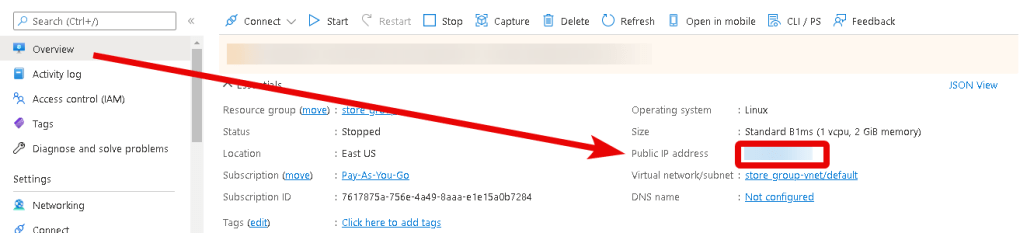
- To manage the server, you should connect to a VM.
- With OpenSSH
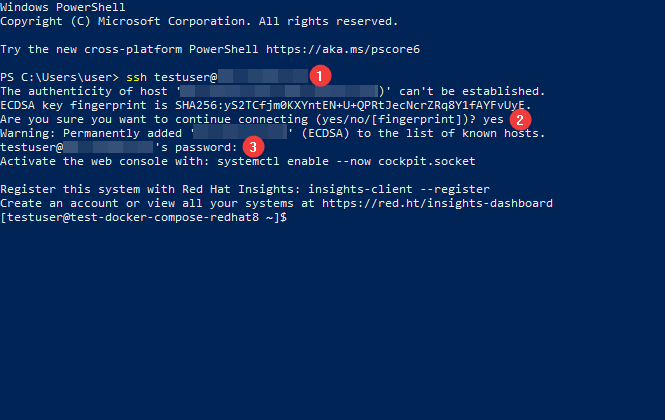
In the Windows operating system (starting with version 1809), an OpenSSH client is available, with which you can connect to Linux servers via SSH. To do this, launch a normal Windows command prompt and enter the command “ssh user@*vm_ip*” (1), where “user” is the username that was specified while creating the virtual machine and “*vm_ip*” is the VM IP address.
Then type “Yes” (2) and enter a password (3) that was specified while creating the virtual machine.
- With the PuTTY application
To do this, you need to connect via SSH to the PuTTY application. You can download it at the following link – Download
Run PuTTY, enter the VM address in the “Host” field (1), and click “Open” (2) to connect.
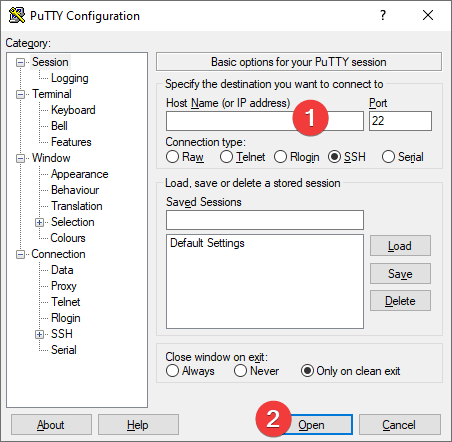
In the window that appears, click Accept.

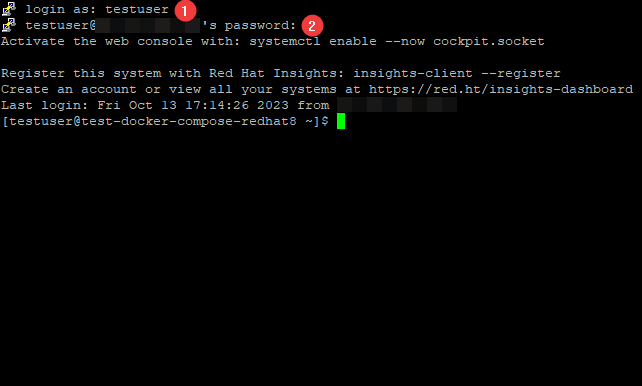
In the opened console, you will need to enter a username (1) and a password (2) that were specified while the VM was being created (you’ll not see the password in the console while entering it).
- You can view the parameters of your virtual machine using the commands:
$hostnamectl — general information
$cat /etc/*elease — release information
$uname -r — kernel version
Now you can use our well-prepared Basic VM for Rocky Linux™ 10.
 Articent Group — Software Apps & Virtual Machine Solutions